Every event has walk-ins, and most platforms treat them as somebody else’s problem. The desk takes cash into a drawer, writes the name on a pad, and on Monday the finance team is left reconciling a pile of notes against a report that never knew those people existed.
In evenclo a sale at the door is a ticket sale. It is the same order the website would have created, settled by your staff instead of a gateway.
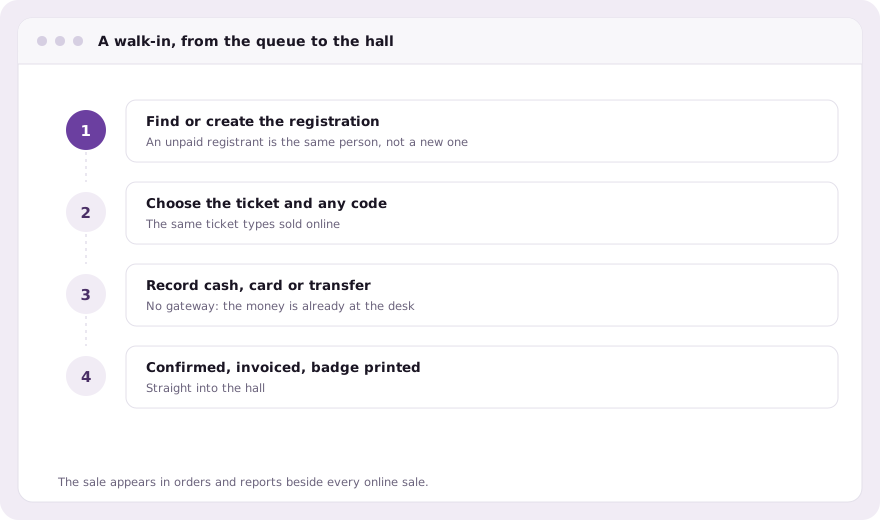
Register the walk-in, then sell to them
The person is registered first, from the organizer app or the desk, with the same form fields everyone else filled in. Then the ticket is sold to that registration. That order matters, because the most common walk-in is not a stranger at all: it is somebody who registered weeks ago and never paid, and selling to their existing record keeps them one person instead of two.
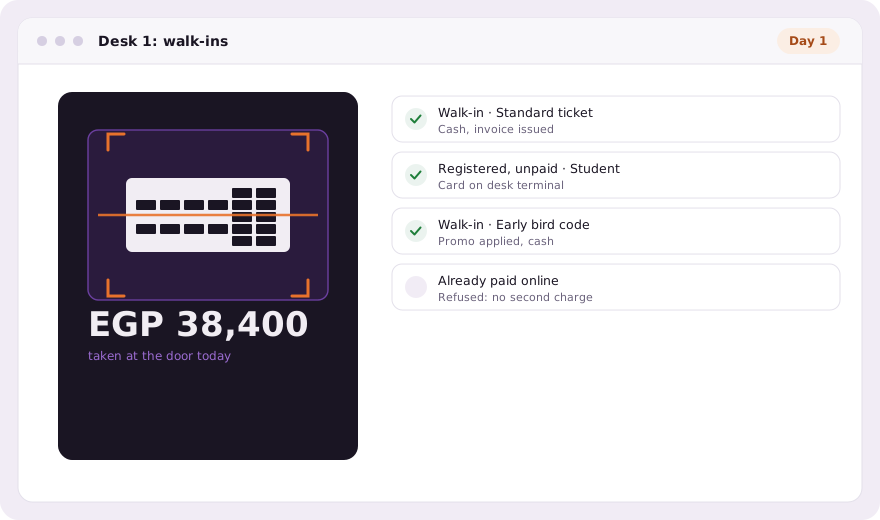
No gateway, because the money is already here
Nothing is charged online. The money is in the cash drawer or on a card terminal that belongs to you, so the desk records how it was paid: cash, card or transfer. The order is then settled exactly as an online payment would be. The registration is confirmed, the invoice number comes from the event’s own sequence, and a promo code counts as used, so the limit on a discount means the same thing at the door as on the website.
- Cash, card on your own terminal, or bank transfer recorded per sale
- Invoice numbers continue the event’s own sequence
- Promo codes and their limits apply at the desk
- The badge prints as soon as the sale is settled
- A registration that is already paid is refused, never charged twice
A button pressed twice on a moving queue
A busy desk will press the button twice. If the registration already has a paid order the second sale is refused, so the queue cannot produce a double charge that somebody has to refund by hand next week. The person behind the desk sees why it was refused, and the attendee walks straight on to the badge printer with the ticket they already bought.
One definition of a ticket sale
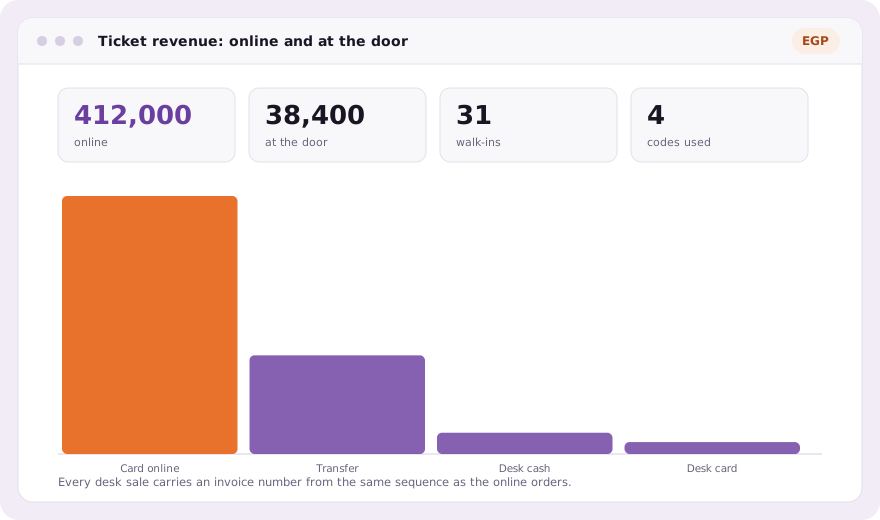
Because a door sale is an ordinary order, the reports need no special case. Revenue by ticket type, by day and by payment method includes the desk, and the export your finance team receives has the walk-ins in it with their invoice numbers, next to the people who paid online.
Common questions
Can I sell tickets at the event itself?
Yes. Staff register the walk-in or find their existing registration, then record a sale paid in cash, by card on your own terminal, or by transfer.
Do door sales get invoice numbers?
Yes. A door sale is settled like any order, so its invoice number continues the event’s own sequence and promo codes count as used.
What if someone already paid online?
The sale is refused. A registration with a paid order cannot be charged again, so a button pressed twice never charges twice.
Book a demo Thirty minutes, screen shared, in Arabic or English.